
提问: 假如你负责的业务有多台服务器, 你需要同时去这些服务器上执行以下几个任务:
- 1.修改Nginx的配置: /data/nginx/conf/nginx.conf 备份的问题
- 2.重启Nginx和jetty, 并确保服务器启动正常
你会使用什么方法处理?
Ansible 是新出现的自动化运维工具,基于Python研发
糅合了众多老牌运维工具的优点,实现了批量操作系统配置、批量程序部署、批量运行命令的功能
仅需在管理工作站上安装ansible程序配置被管理主机IP信息,被管理主机无客户端
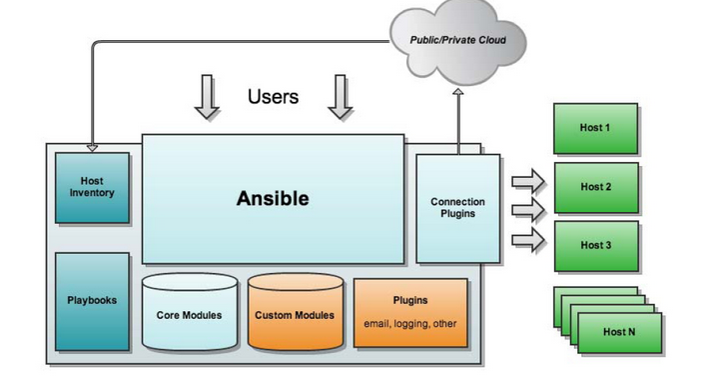
Ansible应用程序存在于EPEL源,依赖于很多Python组件,主要包括:
-
a.连接插件connect plugins:负责和被监控端实现通讯;
-
b.host inventory:指定操作的主机,是一个配置文件里面定义监控的主机;
-
c.各种模块:核心模块、command模块、自定义模块;
-
d.借助于插件完成记录日志邮件等功能;
-
e.playbook:剧本执行多任务是,非必需可以让节点一次性运行多个任务
Ansible 架构
Ansible 安装
如果获取不到应用,请更换源,参考常见问题一;
检查系统是否已安装ansible,如已安装则无需重复安装:
rpm -q ansibleCentos:
yum install ansibleUbantu:
# sudo apt-get install software-properties-common
# sudo apt-add-repository ppa:ansible/ansible
# sudo apt-get update
# sudo apt-get install ansible
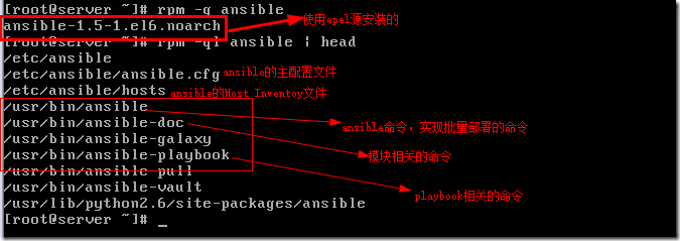
Ansible Consolas:
rpm-ql ansible | head
组与主机的概念
hosts:/etc/ansible/hosts
[webtest]
webtest1.meizu.com
webtest2.meizu.com
webtest3.meizu.com

[webService]
172.17.16.1
172.17.16.2
172.17.16.3

[webService:children]
172.17.16.4
172.17.16.5
172.17.16.6

[webService:var]
ansible_ssh_port = 22     #远程主机登陆端口
Ansible_ssh_user = user    #远程主机登陆用户名
Ansible_ssh_pass = password    #远程主机登陆用户名的密码
ansible_ssh_private_key_file = /etc/ansible/hosts  #指定管理主机群列表文件
host_key_checking = False   #跳过第一次连接检测询问是否登陆的提示(YES/NO)
ansible.cfg : /etc/ansible/ansible.cfg
http://ansible-tran.readthedocs.io/en/latest/docs/intro_configuration.html
[defaults]

# some basic default values...

#inventory      = /etc/ansible/hosts
#library        = /usr/share/my_modules/
#remote_tmp     = $HOME/.ansible/tmp
#local_tmp      = $HOME/.ansible/tmp
#forks          = 5   //并行线程数
#poll_interval  = 15
#sudo_user      = root
#ask_sudo_pass = True
#ask_pass      = True
#transport      = smart
#remote_port    = 22
#module_lang    = C
#module_set_locale = True
Angent 连接设置
- 用户名密码ssh连接
# /etc/ansible/hosts

172.17.49.67 ansibe_ssh_user=meizu ansible_ssh_pass=meizu.com

 # ansible -i "172.17.49.67," all -m ping
- Keygen 连接
  # ssh-keygen
  # ssh-copy-id user(用户名)@angentIP(目标IP)
Ansible 命令执行模块
- command模块:该模块通过-a跟上要执行的命令可以直接执行,不过命令里如果有带有如下字符部分则执行不成功: “<”, “>”, “|”, “&” ;
- shell 模块:用法基本和command一样,不过其是通过/bin/sh进行执行,所以shell 模块可以执行任何命令,就像在本机执行一样;
- raw模块:用法和shell 模块一样 ,其也可以执行任意命令,就像在本机执行一样;
- script模块:其是将管理端的shell 在被管理主机上执行,其原理是先将shell 复制到远程主机,再在远程主机上执行,原理类似于raw模块
- 自定义模块
Introduction To Ad-Hoc
$ ansible all -m ping
$ ansible jrzf -m command -a 'date'
$ ansible testHost -m copy -a "src=/etc/hosts dest=/tmp/hosts"
$ ansible testHost -m shell -a “/data/jetty/bin/test.sh"
$ ansible testHost -m script -a "/data/jetty/bin/test.sh"
$ ansible testHost –m setup
…
File Transfer
File:主要用于远程主机上的文件操作(directory、file、link、hard、touch、absent )
$ ansible testHost -m file -a "dest=/srv/foo/a.txt mode=600"
$ ansible testHost -m file -a "dest=/path/to/c mode=755 owner=mdehaan group=mdehaan state=directory"
$ ansible testHost -m file -a "dest=/path/to/c state=absent"
$ ansible testHost -m file -a "path=/tmp/test state=touch"
Copy::复制文件到远程主机(dest、backup、content、 directory_mode、 force、src)
$ ansible testHost -m copy -a "src=/etc/hosts dest=/tmp/hosts“
$ ansible testHost -m copy -a "src=/srv/myfiles/foo.conf dest=/etc/foo.conf owner=foo group=foo mode=0644"
$ ansible testHost -m copy -a "src=/mine/ntp.conf dest=/etc/ntp.conf owner=root group=root mode=644 backup=yes"
Managing Package
Ansible 提供对 yum 和 apt 的支持,这里是关于 yum 的示例
name:要进行操作的软件包的名字,也可以传递一个url或者一个本地的rpm包的路径
state:状态(present,absent,latest)
确认一个软件包已经安装,但不去升级它:
$ ansible webservers -m yum -a "name=acme state=present"

确认一个软件包的安装版本:
$ ansible webservers -m yum -a "name=acme-1.5 state=present"

确认一个软件包还没有安装:
$ ansible webservers -m yum -a "name=acme state=absent"
查看 ansible 所有模块:
$ ansible-doc –l

查看指定模块的文档:
$ ansible-doc <模块名>  eg. ansible-doc service

查看远程服务器的状态:
$ ansible testHost -m setup
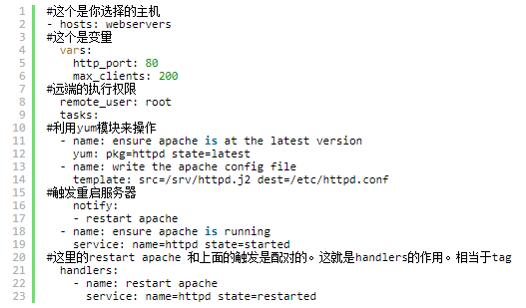
Ansible Playbook
常见问题:
一、yum 源更换(阿里云源):
- 备份:
mv /etc/yum.repos.d/CentOS-Base.repo /etc/yum.repos.d/CentOS-Base.repo.backup
- 下载新的CentOS-Base.repo 到/etc/yum.repos.d/:
CentOS 5:
wget -O /etc/yum.repos.d/CentOS-Base.repo http://mirrors.aliyun.com/repo/Centos-5.repo

CentOS 6:
wget -O /etc/yum.repos.d/CentOS-Base.repo http://mirrors.aliyun.com/repo/Centos-6.repo

CentOS 7:
wget -O /etc/yum.repos.d/CentOS-Base.repo http://mirrors.aliyun.com/repo/Centos-7.repo
- 之后运行 yum makecache 生成缓存
参考文档:http://blog.51cto.com/11005114/1812386